> ## Documentation Index
> Fetch the complete documentation index at: https://docs.formbase.dev/llms.txt
> Use this file to discover all available pages before exploring further.
# Email Notifications
> Get an email when a new submission arrives.
Formbase can send an email every time a form receives a new submission. This is useful for small teams or forms that require immediate follow-up.
Notifications are enabled per form and are delivered using your configured email provider (SMTP or Resend).
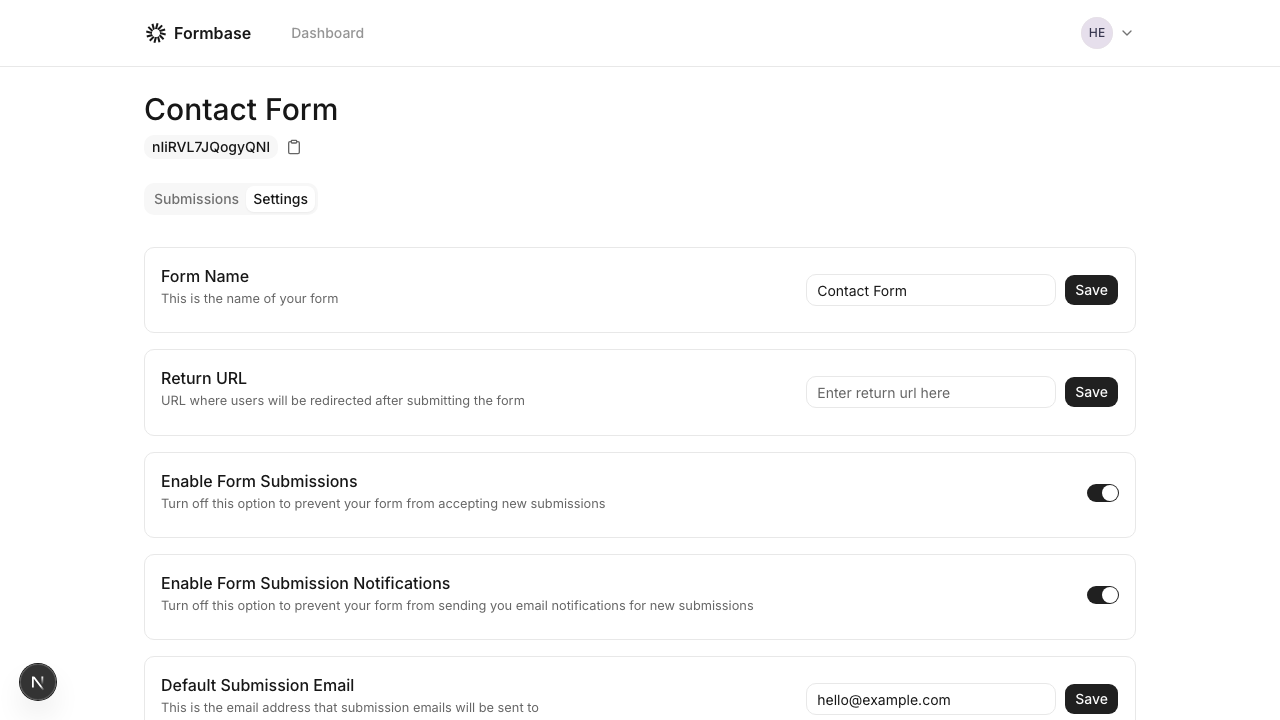
Open your form, go to the "Settings" tab, and toggle "Enable Form Submission Notifications".
 If you are self-hosting, set up SMTP or Resend in your environment. See [Email setup](/self-hosting/email-setup).
Submit a test entry and confirm the email arrives.
Notification emails are sent to the form's default recipient email. Update it in settings if needed.
If you are self-hosting, set up SMTP or Resend in your environment. See [Email setup](/self-hosting/email-setup).
Submit a test entry and confirm the email arrives.
Notification emails are sent to the form's default recipient email. Update it in settings if needed.