> ## Documentation Index
> Fetch the complete documentation index at: https://docs.formbase.dev/llms.txt
> Use this file to discover all available pages before exploring further.
# API Overview
> Access your forms and submissions programmatically with the Formbase REST API
## Introduction
The Formbase API provides programmatic access to your forms and submissions. Use it to build custom integrations, automate workflows, or manage your forms from external applications.
## Base URL
All API requests should be made to:
```
https://formbase.dev/api/v1
```
## Authentication
The API uses Bearer token authentication with API keys. Include your API key in the `Authorization` header:
```bash theme={null}
curl -X GET "https://formbase.dev/api/v1/forms" \
-H "Authorization: Bearer YOUR_API_KEY"
```
Keep your API keys secure. Don't share them in public repositories or expose them in client-side code.
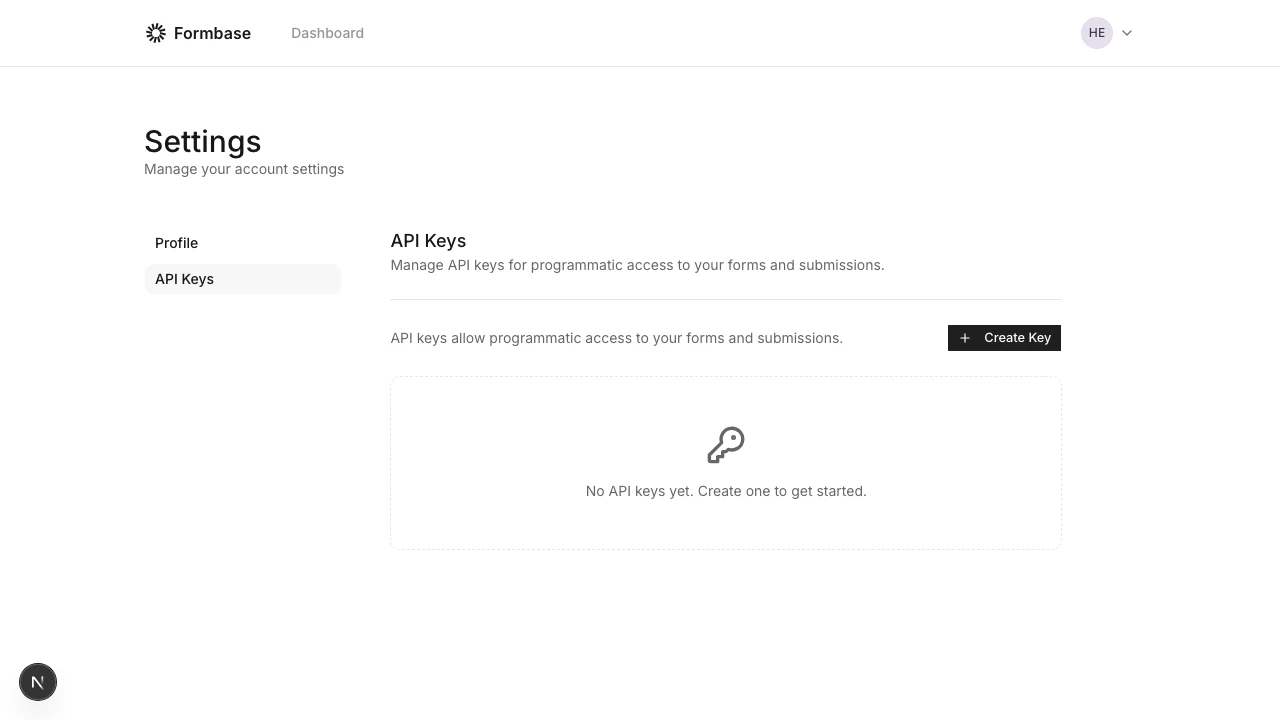
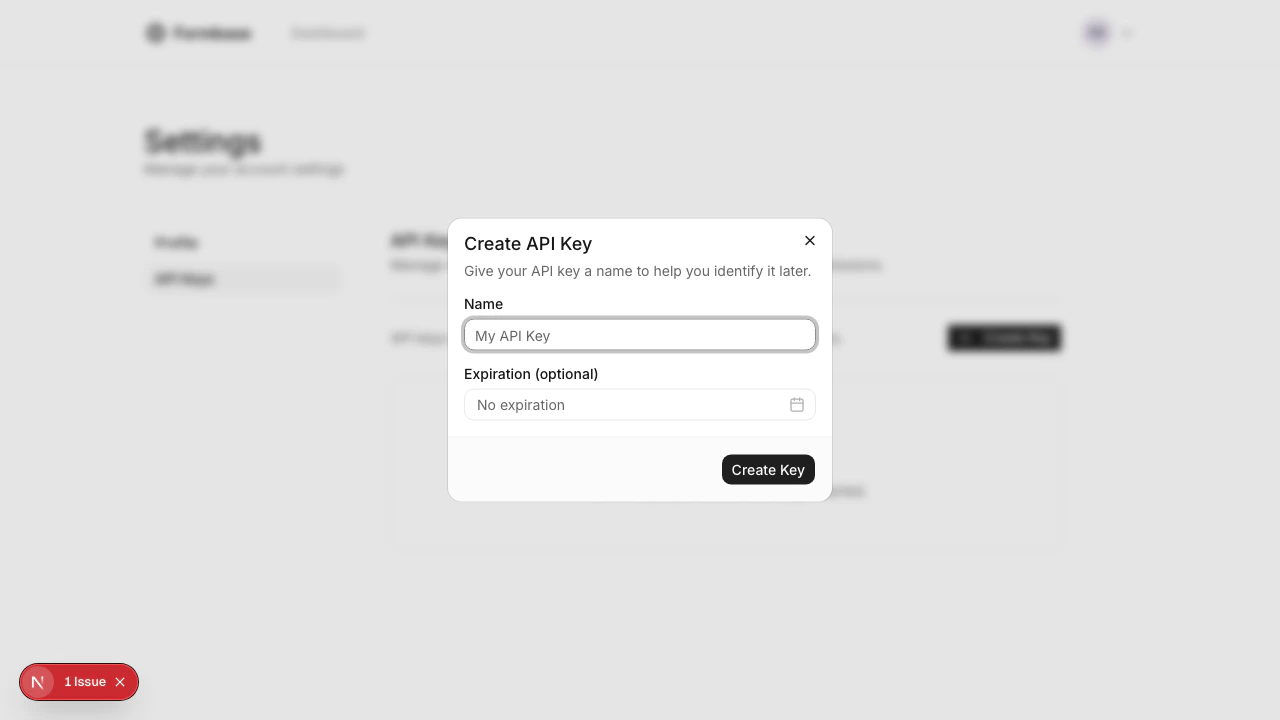
### Creating API Keys
1. Go to your [Dashboard Settings](https://formbase.dev/dashboard/settings/api-keys)
2. Click "Create Key"
3. Give your key a descriptive name
4. Optionally set an expiration date
5. Copy the key immediately - it won't be shown again
 ## Rate Limits
API requests are rate limited to **100 requests per minute** per API key.
Rate limit information is included in the response headers:
| Header | Description |
| ----------------------- | -------------------------------------------------- |
| `X-RateLimit-Remaining` | Number of requests remaining in the current window |
| `X-RateLimit-Reset` | Unix timestamp when the rate limit resets |
When you exceed the rate limit, the API returns a `429 Too Many Requests` response with a `Retry-After` header indicating how many seconds to wait.
## Error Responses
All errors follow a consistent format:
```json theme={null}
{
"error": {
"code": "NOT_FOUND",
"message": "Form not found"
}
}
```
### Common Error Codes
| HTTP Status | Code | Description |
| ----------- | ----------------------- | -------------------------- |
| 400 | `BAD_REQUEST` | Invalid request parameters |
| 401 | `UNAUTHORIZED` | Missing or invalid API key |
| 404 | `NOT_FOUND` | Resource not found |
| 429 | `TOO_MANY_REQUESTS` | Rate limit exceeded |
| 500 | `INTERNAL_SERVER_ERROR` | Server error |
## Pagination
List endpoints return paginated results with the following structure:
```json theme={null}
{
"forms": [...],
"pagination": {
"page": 1,
"perPage": 20,
"total": 45,
"totalPages": 3
}
}
```
### Query Parameters
| Parameter | Default | Max | Description |
| --------- | ------- | --- | -------------- |
| `page` | 1 | - | Page number |
| `perPage` | 20 | 100 | Items per page |
## OpenAPI Specification
The complete OpenAPI specification is available at:
```
https://formbase.dev/api/v1/openapi.json
```
You can use this specification with tools like Postman, Insomnia, or code generators.
## Rate Limits
API requests are rate limited to **100 requests per minute** per API key.
Rate limit information is included in the response headers:
| Header | Description |
| ----------------------- | -------------------------------------------------- |
| `X-RateLimit-Remaining` | Number of requests remaining in the current window |
| `X-RateLimit-Reset` | Unix timestamp when the rate limit resets |
When you exceed the rate limit, the API returns a `429 Too Many Requests` response with a `Retry-After` header indicating how many seconds to wait.
## Error Responses
All errors follow a consistent format:
```json theme={null}
{
"error": {
"code": "NOT_FOUND",
"message": "Form not found"
}
}
```
### Common Error Codes
| HTTP Status | Code | Description |
| ----------- | ----------------------- | -------------------------- |
| 400 | `BAD_REQUEST` | Invalid request parameters |
| 401 | `UNAUTHORIZED` | Missing or invalid API key |
| 404 | `NOT_FOUND` | Resource not found |
| 429 | `TOO_MANY_REQUESTS` | Rate limit exceeded |
| 500 | `INTERNAL_SERVER_ERROR` | Server error |
## Pagination
List endpoints return paginated results with the following structure:
```json theme={null}
{
"forms": [...],
"pagination": {
"page": 1,
"perPage": 20,
"total": 45,
"totalPages": 3
}
}
```
### Query Parameters
| Parameter | Default | Max | Description |
| --------- | ------- | --- | -------------- |
| `page` | 1 | - | Page number |
| `perPage` | 20 | 100 | Items per page |
## OpenAPI Specification
The complete OpenAPI specification is available at:
```
https://formbase.dev/api/v1/openapi.json
```
You can use this specification with tools like Postman, Insomnia, or code generators.